
Subscribe Now: standard

Disclaimer

DISCLAIMER

All 'characters' on this blog are fictitious
and bear no resemblance to any 'character'
living or dead.

Search For Your Ubuntu Package.

Facebook Badge

Showing posts with label Programming. Show all posts

Wednesday, June 29, 2011

I need to develop my J2EE application in Ubuntu


First things first : this is not for those not so geeky and nerdy wannabes who just can't move away from the comfort of using a Mac or a Windows system. Not to say that Ubuntu or Linux is not a comfort zone; but you surely need an anchor to take you to the shore.

Now , if you've really worked on a project in J2EE, then you surely would have used an IDE ( hats off to you, if you've used notepad to work on a J2EE project ). NetBeans ? Well its not really a coffee making machine but an IDE ( God help you if you've never heard of it ).

Let's get serious now. Can we use NetBeans to develop a web application on the Ubuntu platform ? Yes , we can! ( what...who Obama ? , we are discussing Ubuntu here ) . NetBeans for Ubuntu in available in the 'Synaptic Package Manager' . You don't need a screenshot for this , do you ? The next thing you require is the Java Development Kit ( jdk ) .Just search for 'jdk' and install 'sun-java6-jdk'.

Now you need to have that web-server that you would use to deploy your application.Download Java EE 6 SDK Update 2 from the link provided at the bootom. Again an issue here ? How do you install a file with '.sh' extension. Well, its not rocket science. Just right click on th file and under the 'Permissions' tab , 'Allow executing file as program'. Now just double click on the file and 'Run' . Keep track of the GlassFish installation directory.


To start working on a project, launch 'NetBeans' . Use 'File' -> 'New Project'. Ready for a surprise! No 'Java Web' to choose from as an option. Well, things are again very simple. Just click on the 'Tools' -> 'Plugins'. Under the 'Available Plugins' tab, search for 'Java web' and mark it for installation. Don't worry about dependencies. Like the 'Synaptic' let 'NetBeans' take care of it.


Now there are two more steps you need to perform to start working. You need to add a server. Go to 'Tools' -> 'Servers' and 'Add Server' . Choose 'Glassfish Server 3' . Provide the directory of the server ( I asked you to keep track of it ). Once the server is set , click on the 'Java' tab and provide the path to the 'Java Executable'. Well , I again come into the picture . This path is '/usr/lib/jvm/java-6-sun/bin/java'. You'll have to move one level up from your home directory to follow this path.
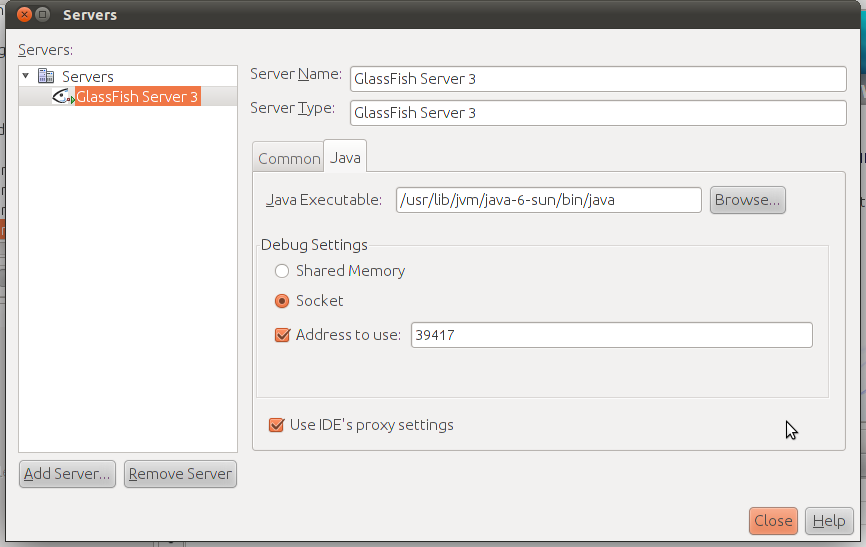

Yeah! It's finally over. Start working on an application now. I just did .

p.s : There's hardly anything that can not be accomplished on Ubuntu. Just take your time. You don't need to be an 'engineer' ( not one of those with that Er. prefix at least ) to accomplish this.

Click here to download Java EE 6 .

Sunday, October 24, 2010

Logic Programming In Ubuntu


The 'YAP Prolog System' provides a great solution to your prolog programming needs in Ubuntu.Available in the Synaptic , simply search for 'yap and install.
To launch a prolog session , launch the terminal and enter 'yap' at the command line. This would take you right to the prompt where you could ask questions. But where's the database of rules and facts?
There are actually two ways of providing the relevant database to the compiler.In one of the modes , you can create a simple text file consisting of facts and rules and save it in your home directory. To let the compiler compile this file simply type '[file_name]' after the '?' prompt.Then you could ask relevant questions and get results.


I the second mode, you could provide facts and rules at the command line itself. To do this type in '[user]' after the '?'.Here 'user' is not your username. It has to be '[user]' only. Then to ask questions type Ctrl+d.


Thursday, August 14, 2008

Compiling C/C++ Programs Using CODE::BLOCKS 8.02


To get all your C/C++,JAVA and other programs compile and run in ubuntu 8.04/Linux use CODE::BLOCKS 8.02.
CODE::BLOCKS is an open source,cross platform IDE.It is highly configurable.Download the codeblocks 8.02 and libcodeblocks debian packages and install them.Let it install all the dependencies itself.For compiling your programs you need to have g++ compiler installed.Go to the synaptic package manager and search for g++.Mark it for installation.Similarly,if you want to compile JAVA programs install the latest version of JAVA from the synaptic package manager.
Now go to the Programming Section in the Applications menu and open CODE::BLOCKS or press ALT+F2 and enter codeblocks.The interface gives you the options to create new projects,report bugs etc.But to compile and run a simple C/C++ program ,press shift+control+n.First of all save the untitled file with the name of your program and the extension (.c,.cpp etc.).Now,start editing the file.After completing the editing press shift+control+f9 (compile from Build menu) and then to run the program press control+F10 (run from the Build menu).If compiled without any errors , the program would run in a terminal window.
You can keep on configuring CODE::BLOCKS according to your needs.CODE:BLOCKS supports various plug ins that can be managed from the Plug ins menu.New plug ins can be added to increase the functionality of the program.From changing the environment,layout splash screens,looks to choosing the default compiler,everything can be configured according to needs of the users.Let us leave the more advanced features for the more experienced programmers.
More Information:www.codeblocks.org , info@codeblocks.org