



Showing posts with label Command Line. Show all posts
Showing posts with label Command Line. Show all posts
Sunday, October 31, 2010
Understanding the 'swap'.
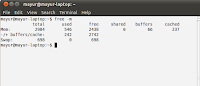
While installing Ubuntu 10.10 Ubuntu 10.10 - the Maverick Meerkat , you surely would have had to reserve some area of the disk for 'swap' . But what is this 'swap' ? Here it goes: Swap is that area of the disk which the operating system ( kernel ) uses to store active processes before calling them again for running. This is actually a part of the switching process that happens in a multiprocessing environment. Check the status of your system's swap by typing ' free -m ' at the terminal.


Sunday, October 24, 2010
Logic Programming In Ubuntu
The 'YAP Prolog System' provides a great solution to your prolog programming needs in Ubuntu.Available in the Synaptic , simply search for 'yap and install.
To launch a prolog session , launch the terminal and enter 'yap' at the command line. This would take you right to the prompt where you could ask questions. But where's the database of rules and facts?
There are actually two ways of providing the relevant database to the compiler.In one of the modes , you can create a simple text file consisting of facts and rules and save it in your home directory. To let the compiler compile this file simply type '[file_name]' after the '?' prompt.Then you could ask relevant questions and get results.

I the second mode, you could provide facts and rules at the command line itself. To do this type in '[user]' after the '?'.Here 'user' is not your username. It has to be '[user]' only. Then to ask questions type Ctrl+d.


Thursday, August 26, 2010
Creating banners in the Ubuntu terminal!

SCO UNIXware has a built in 'banner' program that creates a blown-up version of the characters you supply with the command.
However, Ubuntu does not provide this program. A workaround for this is a 'banner' clone called 'sysvbanner' that does the same job.
Simply search for 'sysvbanner' in the 'Synaptic Package Manager' and mark it for installation.
Banners are created horizontally using the '#' symbol.

Subscribe to:
Posts (Atom)